 |
VHS & Camcorder Video to Mac Transfer Kit |
All those old video tapes you own are slowly degrading.
The longer you leave it, the more they'll deteriorate.
Use our kit to make them digital and they'll last a lifetime.
Copy all those old video tapes to your Mac, then upload to iTunes, iPad, Apple TV, Facebook, YouTube or burn to DVD.
Transfer your wedding video, school play, ski holiday, skydiving epic or safari adventure.
Contains all the USB leads, software and instructions required to link your VCR or camcorder to your Mac.
|
Using our kit you can:
•
Convert VHS, S-VHS and Betamax video tapes to DVD using your Mac.
•
Grab video from any VCR or camcorder with a Scart or RCA output.
•
Attach any camcorder to your Mac - VHS-C, Video8, Hi8, Digital8, Mini-DV.
•
Grab video from more modern set-top & satellite boxes.
•
Transfer old videos into your iTunes library and onto other devices.
•
Burn to DVD, copy to USB drive, or upload to backup sites like Dropbox.
•
Edit videos using iMovie or Final Cut Pro.
•
Copy to USB memory stick & watch them on your Smart TV or Apple TV box.
•
Share your old videos with friends & family on YouTube or Facebook.
•
Store backups of your precious videos safe in iCloud.
|
Kit
includes:
USB capture device
Scart & phono cables
Video capture software
Printed instructions
Video tutorial
UK phone/email support
|
| |
|
Software included:
Video Capture. Record from any VCR or camcorder to an MP4 video file.
Works with Sonoma, Ventura, Monterey, Big Sur and Catalina on M1 and Intel Macs. YouTube Demo
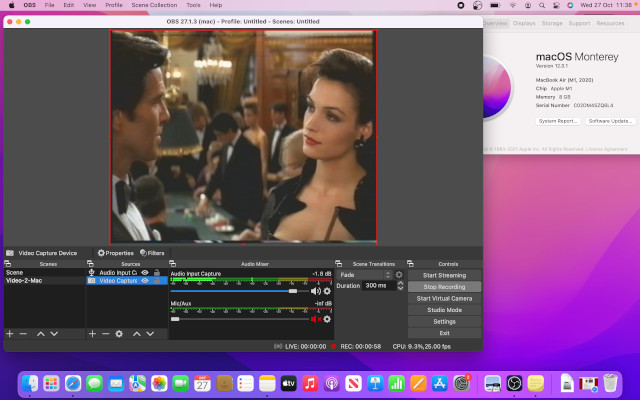
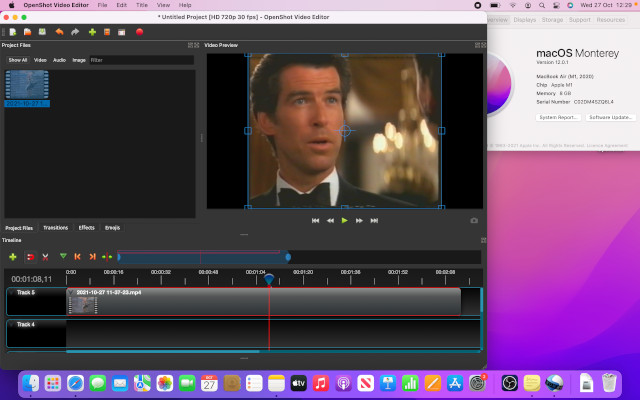
Video Editing - edit your captured videos, add titles, transitions and music.
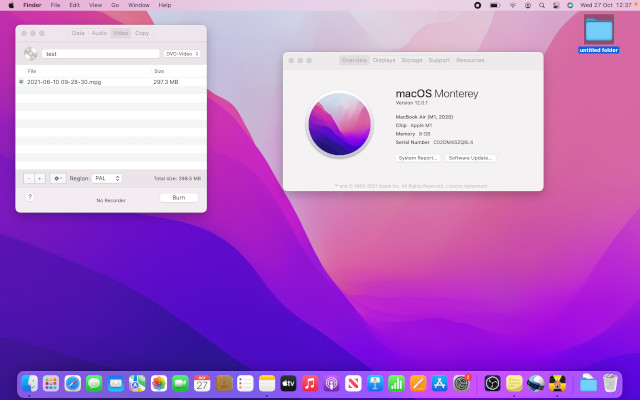
DVD Burning - Make a Video-DVD that will playback in any DVD player. Compatible with internal and external USB DVD writers.
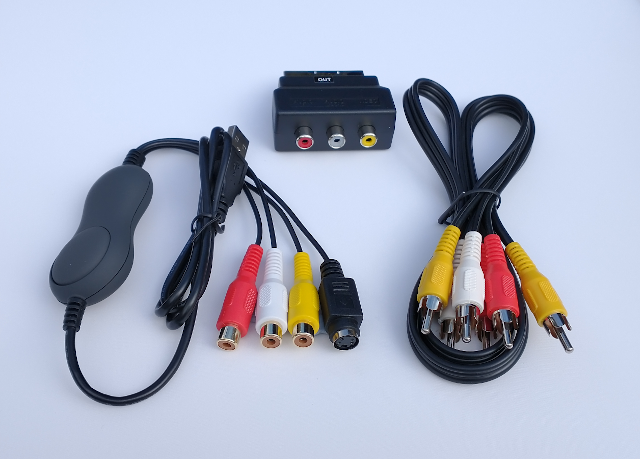
Hardware Included: - Latest chipset USB Video Capture device, 1 metre RCA Phono plug to plug lead and SCART-Out adapter.
|
Why risk sending your tapes away by post?
Our instructions are clear and concise.
We guarantee that you will turn a VHS tape into a DVD in an afternoon.
Money back if not delighted.
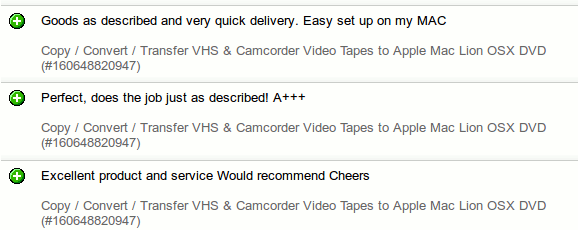
Some recent eBay feedback below.
|
What will the kit copy? What won't it copy?
You'll be able to copy all your own homemade videos and
most things recorded from TV.
Each shop-bought video we tried converted fine (Ivor The Engine, The Clangers, and the Bond movie Goldeneye)
Anything else you have, on what looks like a regular blank tape, should be transferable.
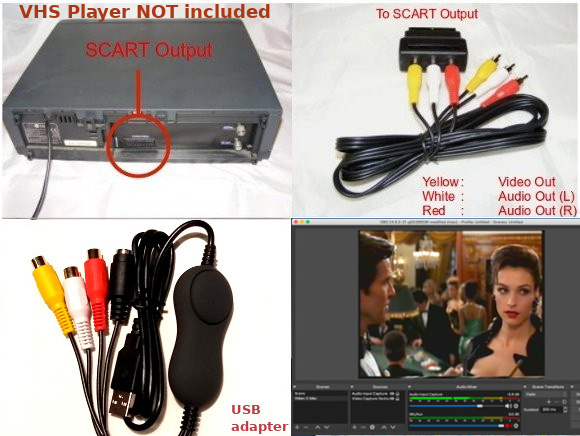
You can connect any older camcorder or VCR - we supply a one metre phono lead and a phono to Scart adapter.
How easy is it to use?
Just plug the Scart adapter into the back of your VHS video player,
attach the phono lead, connect the USB capture device to the phono lead, plug the USB adapter directly into your Mac.
Install software provided. Capture to Mac. Burn to DVD.
What spec Mac do I need?
Any Mac made in the last 12 years will be fine providing it runs one of these versions of Mac OS:
Sierra (10.12), High Sierra (10.13), Mojave (10.14), Catalina (10.15), Big Sur (11), Monterey (12), Ventura (13) and Sonoma
(14
)
Technical info : The software supports PAL & NTSC devices.
Both S-Video and Composite video inputs are supported by the software & USB hardware (we supply a composite lead).
Even and odd fields are combined into single frames that can be captured at full frame rates for the applicable standard (VHS Upscaling).
The maximum supported frame size is: PAL (UK & Europe) 720 x 576 (DVD quality) @ 25fps / NTSC (USA) 720 x 480 @ 29.97fps. Suitable for use in UK, Europe, North America and Australia.
Captures video & audio via a USB port to a standard MP4 file. Our adapter performs time base correction on the incoming signal, which means even your wobbly & wavy 1980s wedding video can be transferred, providing it plays back okay on a TV. You can attach VHS-C, Video8, Hi8, Digital8 & Mini DV camcorders via RCA phono outputs, as well as any VCR with a Scart output. You can also attach more modern devices like, Freeview, satellite & cable, hard drive recorders - basically anything with a Scart output. Also, if you have an older pre-Scart Betamax or VHS player with separate Video & Audio out sockets, we can supply a free BNC bayonet to RCA phono adapter, just ask. (Please note that this newer version of Video-2-Mac no longer supports NTSC433 mode, which is what you use when copying USA NTSC tapes on a UK VCR with NTSC playback. If you want to do this and aren't using Catalina, Big Sur, Monterey, Ventura or Sonoma order the OLD version of Video-2-Mac instead Add to Basket )
In addition to the USB adapter, we also supply a Scart adapter (UK and Europe only) and a one metre long RCA phono plug to plug lead with all orders,
so the kit can be used with all VCRs and camcorders.
Our kit will grab from any VCR or camcorder at DVD resolution with no loss of quality. It will keep recording until you run out of hard drive space.
Video & audio will stay in perfect sync. Edit using OpenShot, iMovie or
Final Cut Pro. Burn to DVD using iDVD or Burn OSX. The DVDs you make will play in any DVD player.
We buy direct from the USB device manufacturers & only supply the most recent versions. We know our products inside and out & only sell direct.
You can buy cheaper looking products from dozens of Chinese vendors on Amazon and eBay, but they'll often supply only half the cables you need or USB hardware with poor signal-sync that gives jumpy results with UK VCRs and camcorders.
Our kit is complete, works perfectly & comes with real UK-based support that's available 7 days a week.
|
Frequently Asked Questions
Q. Is your kit the best product available for converting old videos onto my Mac?
A. We think so. The USB adapters we supply use the
Empia EM28284 chip, which provides time base correction and gives the best possible result. VHS capture YouTube Demo
Q. Does the kit work with the latest Sonoma
14
?
A. Yes. We've personally tested it with Sonoma
14
on the 1/10/2023
. Screengrab here.
Q. How long does it take to get one hour of video onto a DVD?
A. Capturing one hour of video takes 60 minutes. You can then copy it to a USB stick or edit it in iMovie. Burning to DVD takes another 10 minutes.
Q. How much video can I fit on a blank DVD?
A. Two hours on a 4.7GB DVD-R. Three hours & thirty minutes on a dual-layer 8.5GB DVD+R.
Q. My Mac doesn't have a CD/DVD drive, so how do I install the software?
A. We also provide an internet download link for the software & video tutorials
Q. My Mac didn't come with iMovie, Final Cut or iDVD, can I still use your kit?
A. Absolutely. Capture using the provided software and your video is in a standard MP4 file which can be
shared on a USB stick or over the internet and viewed on any PC or Mac using the free
VLC Media Player.
You can burn a DVD using the Burn OSX software included with the kit, no need for iDVD. If you don't have iMovie or Final Cut on your Mac you can use OpenShot to edit your videos.
Q. Where can I read product reviews of Video-2-Mac?
A. Look at our Amazon reviews (500+ reviews, mostly 5 and 4 stars, average 4.5 stars) and
eBay feedback.
Q. Is the Video-2-Mac kit available anywhere else?
A. We only supply Video-2-Mac from this site,
Amazon & eBay.
Q. Can I use Video-2-Mac with OpenCore patched Macs?
A. Yes, we've successfully captured video on an early 2009 iMac with 8GB RAM and 100GB SSD patched
to run Monterey 12.6.2 with OBS Studio 29.0.0 at 640x480 25fps with no problems.
Q. Which versions of the Video-2-Mac USB device drivers and OBS Studio Software work best together right now?
A. Latest USB device drivers USB-VID2MAC-OCT22.zip required for macOS Ventura and/or OBS Studio 30 on arm64/Apple Silicon for M1/M2 Macs.
(Also tested on Monterey, Big Sur, Catalina, Mojave, High Sierra and Sierra.)
Older USB driver M1-11-4-fix.zip needed if you still use El Capitan.
If you're using Sierra or El Capitan, you need to use the older OBS Studio 24.0.6.
High Sierra, Mojave and Catalina use OBS Studio 27.2.4
Big Sur, Monterey, Ventura and Sonoma should use latest OBS Studio 30.0.2.
(Note: only Video-2-Mac kits purchased after 11/11/2019 work with Sonoma, Ventura, Monterey, Big Sur and Catalina,
owners of older kits require a half-price USB adapter upgrade - contact tim@trcomputers.co.uk for details)
Q. Is there an issue with upgrading to Sonoma 14.1.1 / 14.1.2 / 14.2?
A. Yes, there is. The new Sonoma USB driver required a complete rewrite, as the legacy CoreMedia I/O plug-in driver is no longer supported since macOS 14.
Instead, we have to follow Apple's guideline and develop everything under the new architectures, namely USBDriverKit + Camera Extension
Some key points:
Native Apps (i.e. QuickTime Player, PhotoBooth, FaceTime, etc) can now access our device.
The new driver bundles will be in the form of App, residing under /Applications directory.
Due to the current framework limitation, the dynamic resolution change will not be available. As an alternative, the resolution has been capped to 720 x 480 for both NTSC and PAL.
(In OBS Studio, set Video settings to Base Resolution 720x480 and Output Resolution to 720x576 to get correct UK PAL aspect ratio)
Updated Feb 2024: Driver tested with M1 Macbook Air and Intel Mac.
Default brightness tweaked up by 10% - USB-VID2MAC-FEB24.zip
Make sure you follow the installation PDF exactly & then restart your Mac.
Tested with M1 Macbook Air running MacOS 14.1.2 and OBS Studio 30.0.2 & Quicktime video recorder
Screengrab
Please report any success or issues to tim@trcomputers.co.uk
Q. Where can I get the Video-2-PC, Windows USB drivers, software & instructions for the Amazon combo pack?
A. https://www.tpr2.co.uk/Video-2-PC.zip
|
|
You can purchase using the links below to Amazon, eBay and our own TR Computers shop.
Please email any other questions to tim@trcomputers.co.uk
- Order before 1pm Monday to Friday and we'll post your kit the same day.
All UK orders are sent by Royal Mail's 24 hour Tracked post service. Prices include VAT & we supply a receipt. All hardware is new and includes one years warranty. If you aren't completely delighted with Video-2-Mac you can return it for a full refund.(Please return within 30 days of receipt).
Video-2-Mac Kit £39.95 inc VAT
Includes UK postage
Buy via Amazon ,
eBay or
TR Computers
200+ in stock.

Delivery, Returns and Privacy Policy is Here.
All trademarks acknowledged. Site last updated 2nd April 2024
|
|
|
|
|
|